![neticle_w.svg]](https://neticle.com/hubfs/neticle_w.svg)
Neticle's built-in AI Assistant helps you analyze and interpret your media monitoring data faster, both on your interactive dashboards and in your automated reports. Instead of manually reading through hundreds of mentions, you can leverage AI to instantly summarize key trends, explain unexpected chart peaks, or automatically extract insights for your newsletters.
The AI Assistant features are premium add-ons and are not enabled by default on all accounts. If you do not see these options, please contact your Customer Success Manager to activate them.
1. Dashboard Analysis with the AI AssistantThe AI features are fully integrated into your dashboard analysis workflow. To access the AI Assistant:
- Go to any chart on your Neticle Dashboard.
- Click on a specific data point, day, or peak on the chart that you want to investigate. This action triggers a Drilldown.
- Below the chart, the Drilldown view will open, showing you the list of relevant articles, social media posts, or mentions.
- The AI Box is located directly above this list of mentions.
How to Use the AI Box
Once the AI Box is open, you can interact with it using two main methods:
Method A: Use Pre-defined Prompts (Quick Actions)
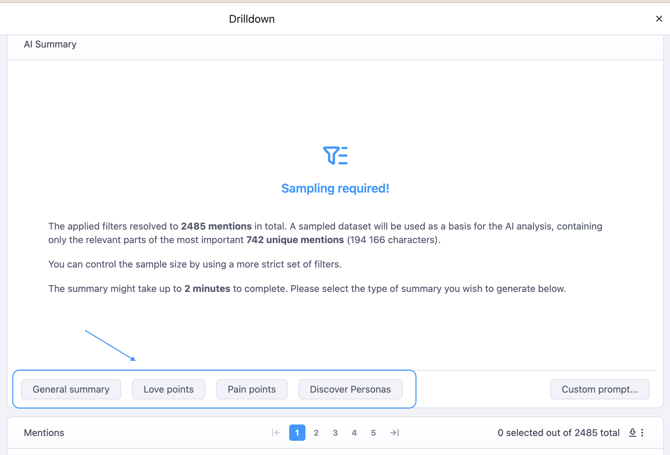
To save you time, we have integrated specific, pre-configured prompts that target the most common analysis needs. You can trigger these instantly by clicking their respective buttons:
- General summary: The AI analyzes the dataset and provides a concise, high-level overview of the main events, topics, or news stories within the selected period.
- Love points: Instantly extracts the most positive aspects, praise, and features that users are expressing appreciation for.
- Pain points: Automatically filters and summarizes the main complaints, issues, or negative feedback mentioned by users.
- Discover personas: Clicking this button generates a detailed profile overview of your typical satisfied and typical dissatisfied customers based on the analyzed dataset. For both of these personas, you will see a clear breakdown of the specific life situations in which they use your product or service, the exact problems they are trying to solve with it, and the unique language, slang, or expressions they use most frequently, delivered in an output that is fully comprehensible and easily understandable to a native English speaker.
Method B: Write Custom Prompts
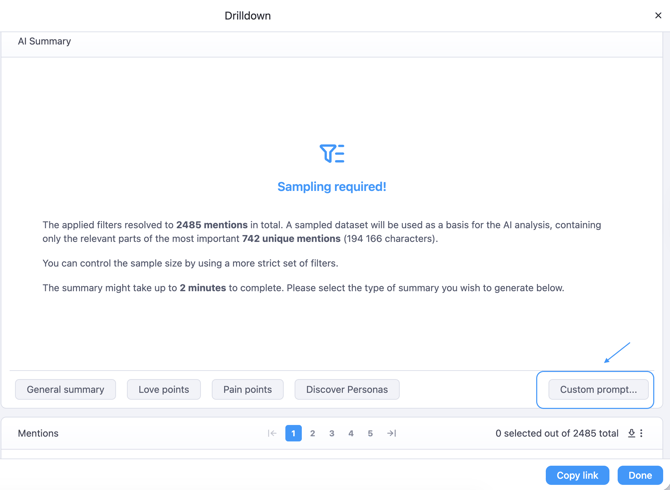
If you need specific information that is not covered by our pre-defined options, you can type your own instructions directly into the AI text field.
Example Custom Prompts:
- "Summarize what users are saying specifically about our customer service in these posts."
- "Which competitors are mentioned alongside our brand in these articles?"
You can also involve the AI Assistant in your reporting workflow to keep your team or stakeholders updated without making them read through every single article.
When setting up your automated newsletters, you can choose to include an AI Box that automatically summarizes the content of the newsletter.
Additional notes and useful information
AI analysis volume limits
The AI is optimized to analyze the active dataset. If your selection contains thousands of mentions, we recommend narrowing down your filters (e.g., by source type or sentiment) for the most accurate and specific AI summary.
Different languages handling with AI
Neticle's AI operates multilingually. It can analyze Hungarian, English, and other regional languages, and you can instruct it to write its final summary in the language of your choice.